
How our Search works
How Advanced Search works
Our advanced search helps you quickly find food poisoning complaints, product recalls, and outbreak notices from our database of reports across multiple countries. Whether you're investigating a specific restaurant, tracking a foodborne illness outbreak, or researching food safety trends, our search engine scans complaint titles, descriptions, and location data to deliver the most relevant and recent results. This page explains how our search algorithm works and what filters are available to refine your results.
What We Search Through
We've taught our search engine to look inside these specific fields of each complaint to find a match:
- Title: The main headline of the complaint.
- Body: The full descriptive text of the complaint.
- Location Details: City, State, Postcode, Country
How Often Data is Updated
Our database is updated in real-time. User reports appear immediately after submission (if made public), while official recalls, outbreaks, and closure notices are aggregated continuously from regulatory agencies worldwide.
What reports are shown
Users can choose whether to make their reports visible and discoverable on the site and in search results. The majority of reports are not shown publicly based on user preference.
Our reporting system and data quality have been validated in independent research. Read our peer-reviewed studies.
If you are a brand interested in accessing all data, please explore our solutions here. If you are a public health agency, click here to learn more about data access.
Advanced search - What You Can Filter By
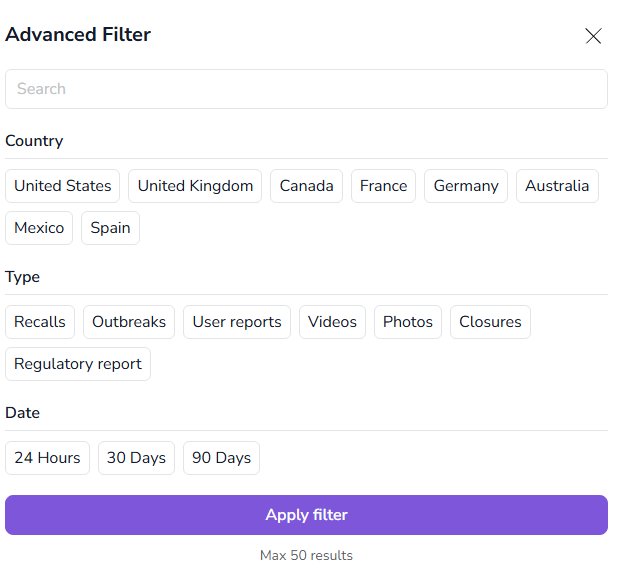
The filter options available to you allow you to narrow down your search results using these attributes:
- Country. We offer a selection of the most commonly reported countries. If you are looking for a different one, you can input it in the search box
- Type. Offers the ability to narrow down to the specific type of report you are interested in:
- Recalls: official product recall notices issued by the authorities or the manufacturing companies
- Outbreaks: official foodborne outbreak notices issued by the regulators
- User reports: filter by other users' reports only, excluding regulatory reports
- Videos: shows only reports containing videos
- Photos: shows only reports containing pictures
- Closures: official closure notices issued by the corresponding authorities
- Regulatory reports: reports showing the result of inspections by the corresponding authorities. This doesn't mean the locations were ordered to close.
- Date. Time filter for the last 24 hours up to 90 days.
How We Rank the Results
We use a specific set of rules to determine the order of the search results, ensuring the best complaints are at the top:
- Sorting: If you've chosen to sort the results (e.g., by date), this rule is applied first.
- Word Match: Complaints that contain all the words you searched for are ranked higher.
- Date: Complaints are prioritized based on their ID, effectively showing the most recently submitted ones first.
- Proximity: Complaints where the search terms appear closer together are considered more relevant.
- Field Importance: We consider which field the match was found in (e.g., a match in the Title might be more important than a match in the Body).
- Exactness: Results that are an exact match for your search terms are given a final boost.
When you select a brand tag or product from the dropdown menu, you'll see a dedicated page showing all reports for that specific entity, sorted chronologically by date. This is different from keyword search results, which rank by relevance based on the algorithm described above.
FAQ
How current is the data in your search results? Our database is updated in real-time as users submit new reports and as we aggregate official regulatory notices from health departments and food safety agencies.
Why can't I find a specific report I'm looking for? Most users choose to keep their reports private. Only reports where users have opted for public visibility appear in search results. If you're a brand or public health agency seeking access to all data, learn about our public health solutions.
What's the difference between searching for a brand and using the brand dropdown? When you search for a brand name using the search box, results are ranked by relevance to your keywords. When you select a brand from the dropdown menu, you'll see a dedicated page with all public reports for that brand sorted chronologically by date.
Can I search for reports by symptoms? Yes, our search scans the full text of complaints, so searching for symptoms like "vomiting," "diarrhea," or "nausea" will return relevant reports containing those terms.